Macros for Humans: Technical Architecture
On the side I've been building Macros for Humans, a cross platform mobile app that folks can use to track their macros, protein goals, calories, weight, etc. The most enjoyable and difficult part to hack on has been the custom RAG pipeline I've built to retrieve the correct ingredients from the USDA databases. Anybody who has used a macro tracking app like myfitnesspal or cronometer understands the nuances between some of the ingredients spread across several databases. For example if you search "deli ham" in cronometer you will get fifty results back. I personally think this is a bit of information overload for the average user. While you need a very robust database for coverage purposes, especially for obscure branded foods, most ingredients that people actually eat are simple foods like eggs, vegetables, and cheese.

The problem
Macros for Humans specializes in transforming unstructured inputs and making sense of it as accurately as possible. The problem that you see in traditional meal tracking software is completely centered around data entry friction. For each ingredient you log with cronometer, you are forced to search the database, iterate on your query, decide on one of the fifty results returned, pick the correct units for your measurement. Most ingredients normalize to store nutrition per 100g, but occasionally you still have to either guess or conduct a mini science experiment to accurately convert your measured mass in grams to an equivalent volume based measurement. This is exactly the case for my wife's favorite autumnal coffee creamer!
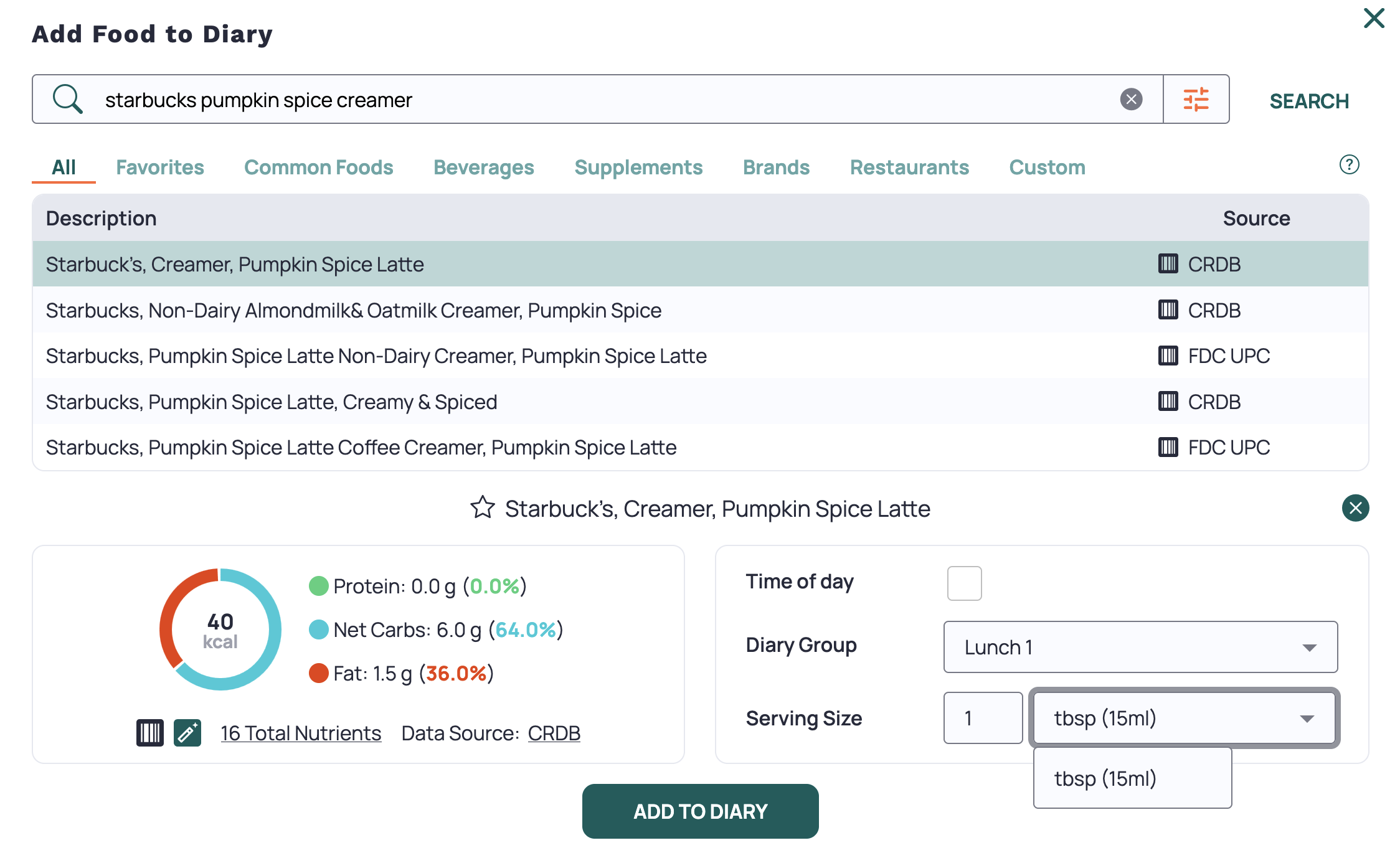
Macros for Humans alleviates this friction by accepting unstructured data, processing it into reasonable base ingredient objects, and then conducting the search and deciding the best ingredient match for you. I've found this speeds up logging significantly. The friction of the traditional macro tracker app scales linearly with the number of ingredients, and so if you're a home cook and you need to build a complex recipe, you can see outrageous (10X or 20X) speedups! Beyond the sheer speed gains, you also reduce total number of clicks to nearly zero. Check out the demo of each app below logging the same meal. I've used cronometer for years, and I'm very fast at navigating it.
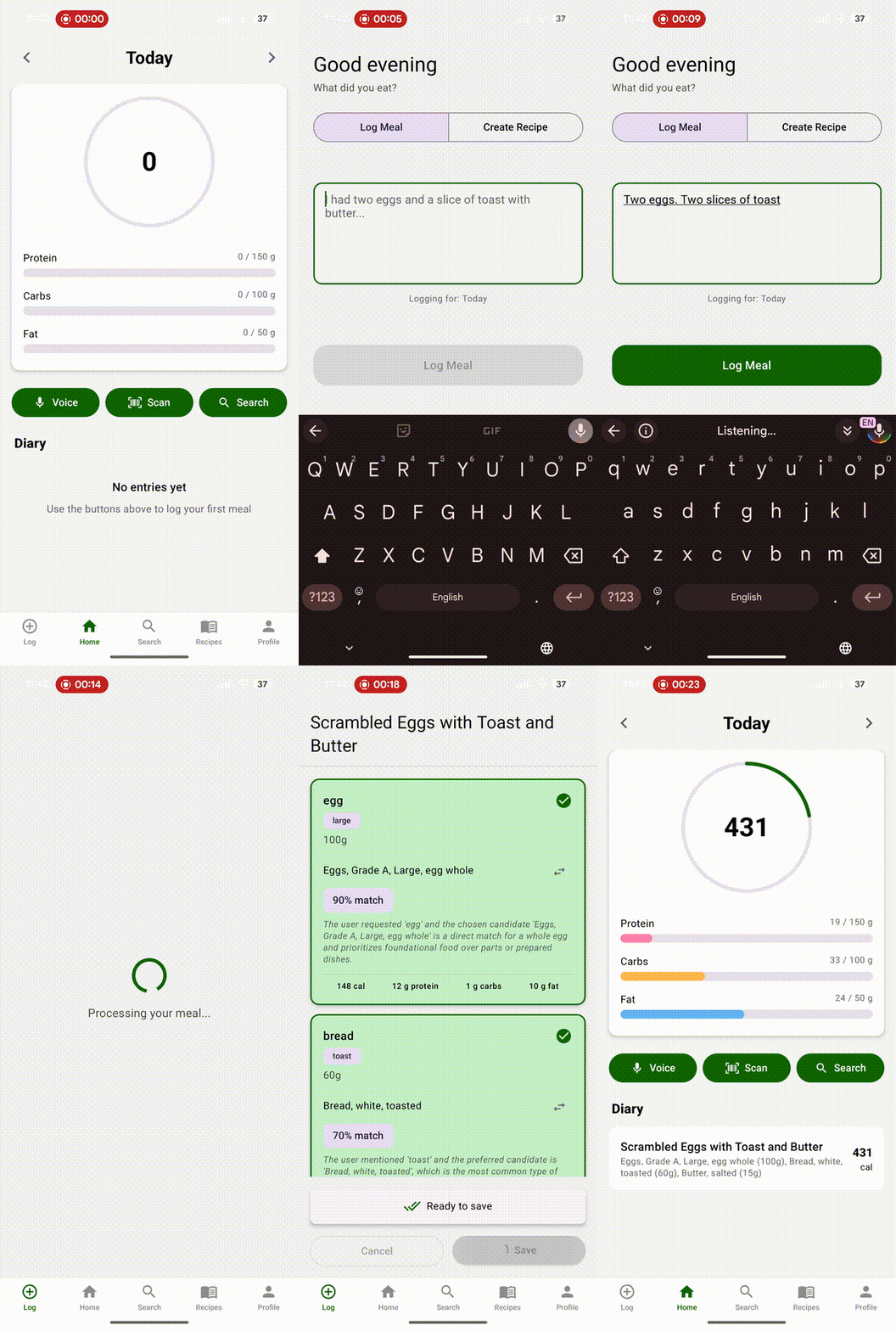
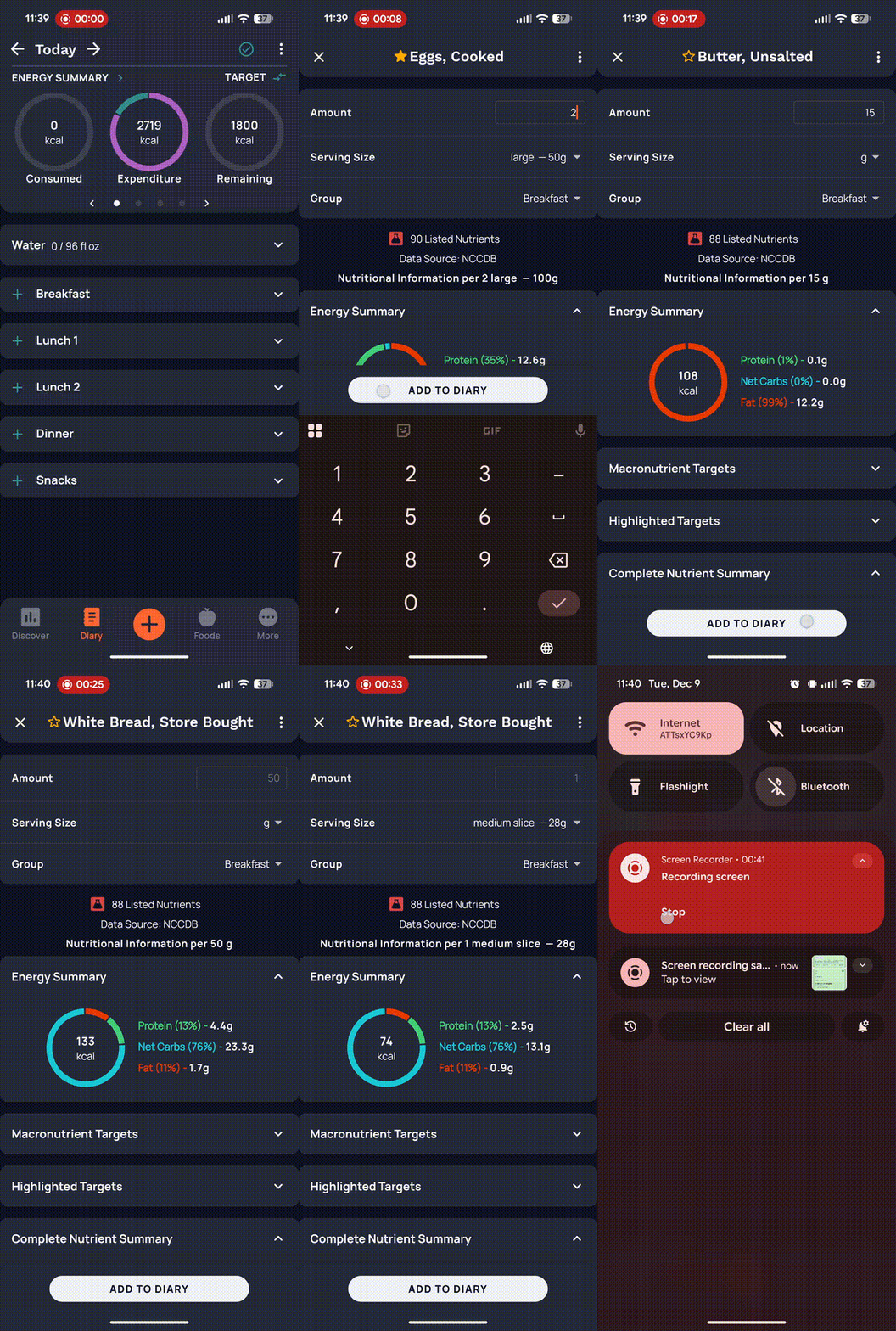
Technical details
The end to end design can be broken into three tasks.
Structured ingredient extraction
An example input to my app is messy text or voice data. For example:
"Two eggs. Two slices of toast, 15 grams butter".
The flexibility here is the feature, so we do not want to enforce
any kind of limitation to this input. This is resilient to
retractions like "wait, no, actually I meant 20 grams of
butter". I have a simple BAML function (prompt) that handles
extraction and parses this out into Ingredient objects.
Here is the BAML class I'm using for those interested:
class Ingredient {
    name string
    extra_descriptors string?
    brand_hint string?
    alternative_search_terms string[]?
    measurement int | float | string @description(#"
        If the user gives an ambiguous measurement, do your best to guess this value in grams.
        Do not assume 100.
    "#)
    units Unit
    branded bool
    raw_transcription string?
    measurement_is_estimated bool @description(#"
        If you had to estimate a measurement like one scoop of protein powder = 36g, then flag it here.
    "#)

    @@stream.done
}
This should look pretty readable for somebody familiar with something like typescript. Some notes on the BAML specific syntax:
@@stream.done- this feature allows you to stream entireIngredientobjects back as valid json as the LLM streams out the individual tokens in its response. It helps decrease time to first token significantly.@description- these are plain text type annotations that get added to the prompt
For more information on what exactly I meant by structured streaming earlier, take a look at their docs or their examples, particularly the recipe generator.
During this initial extraction we ask the LLM to classify if the ingredient is branded or not, note down any additional qualifiers, etc. This is really useful for narrowing things down from 50 results to the ten best. An example of an additional qualifier could be a search for "Ground beef 90% lean, cooked in a skillet, drained" and the result of the initial pull out would look like this:
{
  "title": "Skillet Ground Beef",
  "ingredients": [
    {
      "name": "ground beef",
      "extra_descriptors": "90% lean, cooked, drained",
      "brand_hint": null,
      "alternative_search_terms": null,
      "measurement": 113,
      "units": "Grams",
      "branded": false,
      "raw_transcription": "Ground beef 90% lean, cooked in a skillet, drained.",
      "measurement_is_estimated": true
    }
  ]
}
Note that I didn't give any measurement and it assumed 113 grams? This is a reasonable portion size, but I wanted to showcase the measurement_is_estimated flag. This is set whenever an exact mass is inferred from a fuzzy (or missing) measurement. When I ask it to log two eggs, it automatically assumes 50g a piece for better or worse. I've found the LLM extremely accurate when doing simple estimations. Of course the more you ask of it, the less accurate it becomes.
Ingredient search
Once we've extracted the high level ingredients we're working with, we need to perform a search per ingredient. This is where structured streaming really shines. As soon as the first Ingredient object returns from the LLM, we kick off a search in the official USDA food data central API. This lets us get results for the first query before the last Ingredient object has even been streamed out. In our case we only are searching one ingredient, but you'll be able to see the flow of information well.
From the logs I can see that this was the query it made to the API. They provide a DEMO_KEY which you can use to see the results: https://api.nal.usda.gov/fdc/v1/foods/search?api_key=DEMO_KEY&query=ground+beef+90%25+lean...
Here we have the response with ten matching results in pretty-printed JSON.
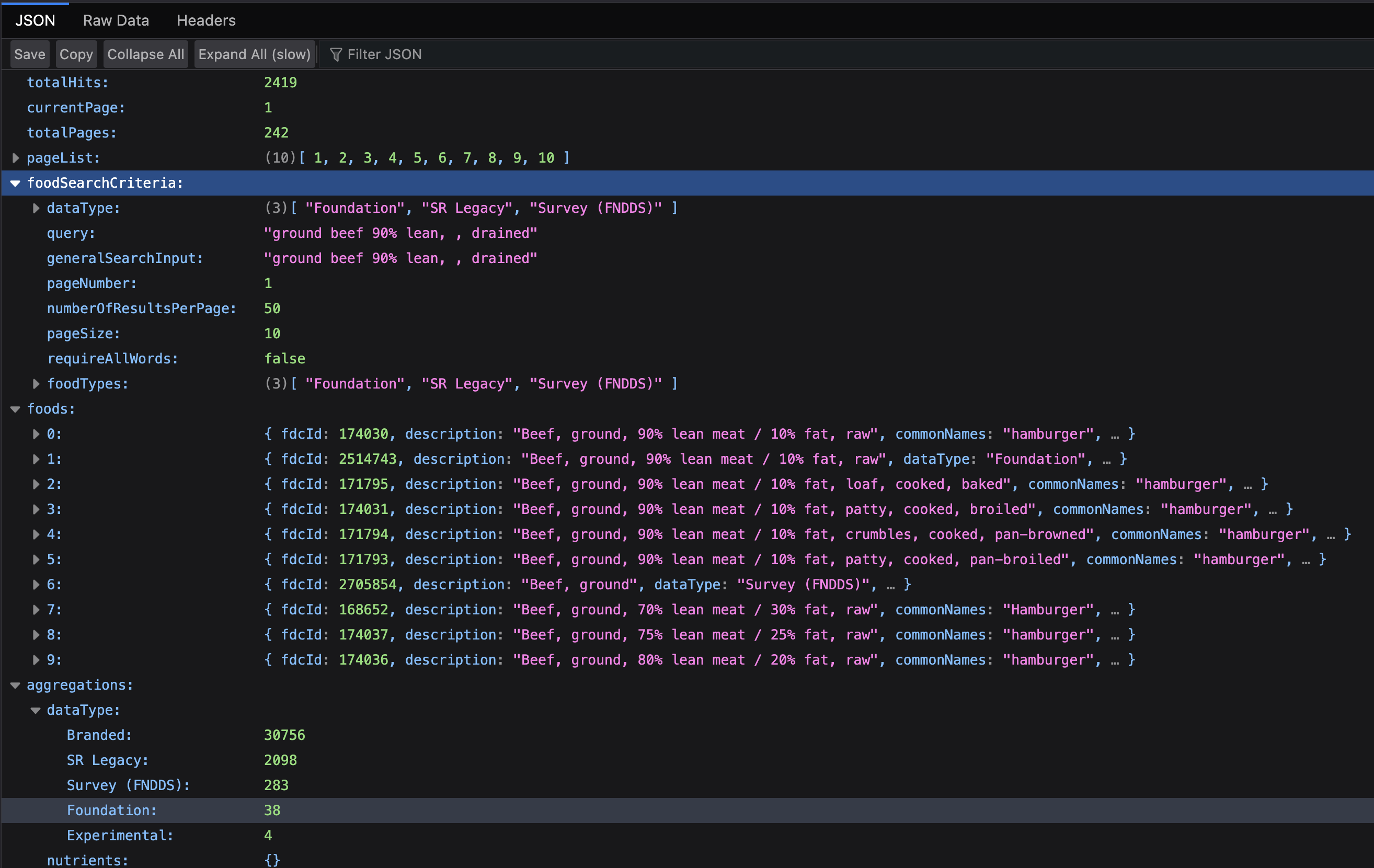
Now, the question becomes, which of these ten is the best fit given the original input text? That is determined by a process I call re-ranking.
Re-ranking (best ingredient selection)
Our prompt to do re-ranking has a lot of extra information, but the crux of it is here:
You are given:
1. The structured ingredient (with name, descriptors, and optional raw_transcription
   capturing the exact words from the caller).
2. A shortlist of USDA FoodData Central candidates produced by a full text search.

Your goal:
- Select the single best USDA candidate from the shortlist that matches the caller's intent.
The re-ranker responds with a final recommendation.
{
  "primary": {
    "fdc_id": 171794,
    "description": "Beef, ground, 90% lean meat / 10% fat, crumbles, cooked, pan-browned",
    "data_type": "sr_legacy_food",
    "score": 840.3608,
    "brand_name": null,
    "gtin_upc": null
  },
  "fallback": null,
  "confidence": 0.84,
  "rationale": "The ingredient is described as '90% lean, cooked, drained' and the selected candidate is 'Beef, ground, 90% lean meat / 10% fat, crumbles, cooked, pan-browned', which closely matches the provided descriptors.",
  "needs_foundational_default": false
}
In addition to all of this, we display a separate React component at each step, which users can manipulate before adding to their diary.
Conclusion
Thanks for following this technical deep dive. BAML has been an incredibly reliable and well thought-out library to use for cases where you need first class support for structured outputs, specifically structured streaming. I think the UI of Macros for Humans is only made possible by BAML and claude (I hate writing react). Macros for Humans will be available for download and purchase by the end of the month on the app store and google play, just in time for new years.
If you're interested in being a beta tester, or just want to chat about AI search and retrieval pipelines like this, send me an email at john@ouachitalabs.com. I would love to chat!
Ouachita Labs blog posts are always written with care by a human brain, proofread with Claude Code.